
MY GOOGLE TASKS AND MAPS
Rubrik UX Exercise
DISCLAIMER
I have taken some assumptions based on the existing Google products and their features. I have tried to design the product in a way that it remains intuitive to the existing users and appears as an incremental feature.
-
This product enhancement is conceived as a part of utilizing GSuite Marketplace/Add-ons among more Google products
-
I have focused on solving the Maps + Tasks use case. The calendar use case is omitted due to the lack of time to solve the complicated use cases that might occur. Tasks can also be created without date/time/location.
-
The enhancement will bring cross-product compatibility to Google Maps. This won’t be just limited to Tasks app, it’ll allow all products in the G Suite Marketplace to build location-based features.
-
I have interacted with some users(5) to understand the different use cases and also to make sure the final solution isn’t biased by my thoughts. This in no way represents the sample size of Google users.
PROJECT BRIEF
-
Google maps (https://www.google.com/maps/ ) have decided to transform the Desktop web offering and add a tasks module and call the newly formed solution called: ‘My Google Tasks and maps’ that will combine the classical Google maps navigation desktop app with task management and your calendar.
-
Try to think what added value the combination can offer and demonstrate it in the use cases you create and show in the UI.
-
The application should be able to let the user easily understand and prioritize tasks based on their location.
-
A user should be able to set new tasks, review and edit existing tasks.
-
Do not create a new application. Leverage and use the existing Google map application and design patterns as a starting point for your new design.
-
Feel free to break out or not use the existing google tasks solution if you feel it constraints you.
COMPETITOR RESEARCH
There are multiple tasks and reminder apps in the market that lets users create location-based tasks/reminders. Some of the major ones and their key features are listed below -
-
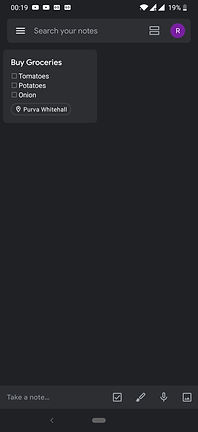
Google Keep - It is a note-taking application with to-do/reminder feature. The user has the option to convert any note or list into a reminder. They can set the reminder based on time or location. The location feature is very limited in this case and doesn’t work very well based on my experience.


-
Apple Reminders - This app comes pre-installed on iOS and Mac OS devices. This app lets users specify whether they want to be reminded while arriving or leaving a location. This is done by setting a radius around the location and when the user enters/exits that circle, they’re reminded of the task.


-
Anon Tasks, Alexa, Any.do and Todoist are some other applications which let users set location reminders. This feature is offered as a premium feature in a lot of these applications. Anon tasks claim to remind users when they reach a particular location. This is done based on a dwelling time set by the user and matching that with the location.
-
Checkmark 2 - This app lets you control the time of a reminder with respect to a location. For eg. if you want to be reminded 15 mins after reaching/leaving a location, this app can help you.
CUSTOMER RESEARCH
Below are some of the questions I have asked the users I’ve interacted with. I tried to avoid mentioning the product and focused on gauging the interest/need for the product by asking about existing products. I would have preferred to follow up this research with detailed questions about the Map product, but that couldn't be done because of the limited time. I managed to have a short discussion with the users about the Map product once these questions were asked.
-
How often do you use Google products?
-
Which Google products do you use the most?
-
Are you aware of the side panel available in Google products?
-
Have you used the side panel? If yes, from which product?
-
Which side panel add-ons have you tried?
-
What do you like about the side panel add-ons?
-
What do you don’t like about the side panel add-ons?
-
Have you used Google Tasks? (Skip if already mentioned in Q.5)
-
What do you like about Google Tasks? (If you have not used the app, please check it out before answering this question)
-
What do you don’t like about Google Tasks?
-
What new features would you like to see in Google Tasks?
VALUE PROPOSITION
Once I could see that there is a need for a reminder app, I interacted freely with the users to understand their expectations from a tasks/reminder app with location feature.
-
Most users prefer to use a tasks app to keep track of things they might forget. These are tasks that the users don’t usually do on a daily basis to become a habit.
-
Some users also suggested they use reminder apps to help develop certain habits like drinking more water, working out etc.
-
Help improve productivity and efficiency
-
Save time and money
USER TYPES
Google products are used by virtually everyone with internet access. So, to define user types for this product was a challenge. Usually, user types and personas are defined based on behavioural, psychographic, demographic, geographic and cultural segmentation of users based on the user research data. We should also consider occasional use cases to make any product foolproof. There are primarily 2 types of users for Google products -
-
Personal Users
-
Organization - Administrators, Employees etc.
I have completely omitted the Organization users to simplify the problem. But for the most part, the product will remain the same for all users. I have created the following persona to help you empathise with the solution.
USE CASES
-
User should be able to create, edit and review tasks
-
A task can have a description and subtasks
-
A task can be time-based or location-based
-
User should be able to list tasks based on time or location
2 task-flows were explored to decide the primary interactions around this product. With the addition of new features, I wanted to figure out what should be the best entry point for users to the app. The desktop app/add-on available on Gmail and Drive has a simple task-flow, which is unaffected by the product they’re integrated with. With maps, I wanted to take an approach which takes into consideration of how people use Tasks app and also customize it for the map context.
Task-flow 1:
-
User opens Google Maps
-
User searches for a location/clicks on a location
-
The user creates a task for the selected location
-
The user provides Task details - description, sub-tasks
-
The task type is selected as Location by default
-
The user selects whether they want to be reminded when they arrive/leave from the location
-
The user defines the radius from location to pin-point, when they want to be reminded. The default radius is set as 100 meters
-
User can also select a date & time with this task if they want to specify on which day they want to be reminded. Also they’ll be notified at the time and at the location, making it less likely to miss the task.
Task-flow 2
-
User opens Google Maps
-
User opens the task app from the side panel
-
The user creates a task
-
The user provides Task details - description, sub-tasks
-
The user selects the task type as Location (By default a task has no type)
-
The user selects whether they want to be reminded when they arrive/leave from the location
-
User can also select a date & time with this task if they want to specify on which day they want to be reminded. Also they’ll be notified at the time and at the location, making it less likely to miss the task.
INFORMATION ARCHITECTURE
The app has a very simple and straight forward information architecture. The map/location related features were added to it, without disrupting the simplicity of the application.
USER INTERFACE
I have omitted creating high fidelity wireframes from my process and instead created UIs directly. This was possible because the brief encouraged to leverage and use the existing application and patterns to solve this problem. Please find below the UI for Task Flow 1. This should give you a fair idea about how this product works.


